This resource is intended to introduce you to our design tool, and how we collect feedback.
What is Figma?
Figma is a design tool that our team uses to create the sitemap, UX wireframes, style tiles, and UI designs. We love Figma for its ability to collect clients’ feedback in one place, and how it allows us to communicate back and forth about a deliverable on the page or section in question. We also love that it enables our clients to preview the design deliverables in-browser—much like a real website.
How do I access Figma?
We will share each Figma deliverable on Basecamp, in the Information Architecture, UX & Site Planning, and UI & Creative Design threads.
When we post each deliverable for the first time, and further rounds, we will always share a Figma link. You can access/open Figma by clicking on those links. You don’t need to install the Figma app—the file will load within your internet browser window. We recommend using Google Chrome or Firefox.
What we share are public links, with view-only access. We don’t grant editor access to anyone outside our team.
How will we use Figma for collaboration?
We collect all feedback on the design deliverables within Figma, via comments. This keeps feedback in one place, which makes it easier for us to be sure we’ve actioned all of your requests. It also provides an easily accessible history of change requests, in case they’re needed later in the project.
If you provide verbal feedback in a meeting, or written feedback in Basecamp or in a content gathering doc, we will ask you to still add comments to Figma.
How do I leave comments?
You need a free Figma account to leave comments.
How to Set Up an Account
When you click the link to the first Figma deliverable, the preliminary sitemap, you’ll see the option at the bottom of the screen to sign up or use your Google account.
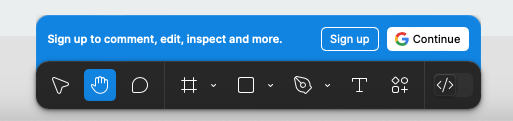
Figma asks you a lot of questions as you sign up, because it assumes its users are designers and it wants to gather data for product improvement. You don’t actually have to provide any information besides your name and email address.
Leaving Comments
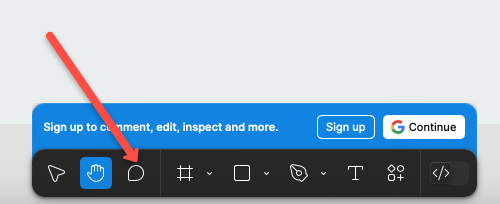
Once you’ve created an account, you can leave comments using the commenting tool. In the sitemap, it’s found in the bottom centre (where you signed up):
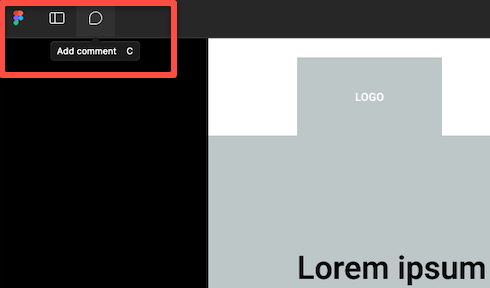
In the UX wireframes and the UI designs, it’s found in the upper left corner:
How to view and reply to comments
Throughout the sitemap, UX, and UI steps, we build and iterate upon the same Figma file. All of the comments from the past iteration(s) of that deliverable remain, unless closed by us or by you.You can view all previous and new comments by clicking to open the comments panel at the top left. Once clicked, you’ll see all comment bubbles on the page, and a list view of comments at the right.

Our team will respond to your comments, either to indicate that we’ve made the change or to ask for more insight. These responses will be nested within your original comment, which you can see by clicking that comment bubble or the comment in the sidebar (the sidebar also shows “1 reply” to indicate which comments have threads).
After a round of changes where no further updates/responses to the comment, we may resolve that comment to clean things up.
Viewing Resolved/Hidden Comments
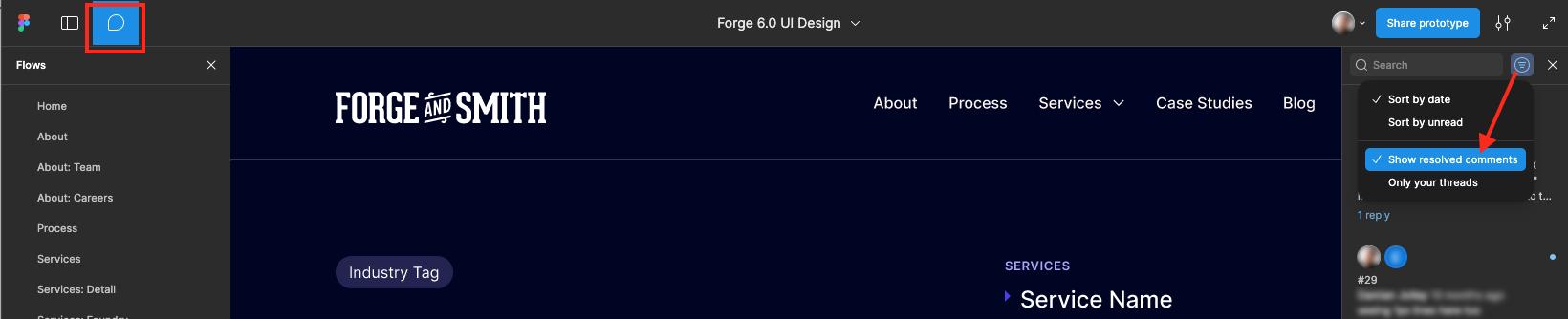
Comments can be resolved, which hides them from view and declutters the deliverable. We mark comments as resolved if the request has been completed. This helps us see what’s left to work through as we approach approvals. If you don’t see one of your previous comments, it was likely marked as resolved. You can still access resolved comments in comment mode by selecting “show resolved comments” from the right side panel.
How We Manage Comments
We don’t monitor Figma comments in real time, we address them all at once in rounds.
Once you’ve completed adding all of your comments for one round, you need to let us know on Basecamp that you’re done. Otherwise, we assume you’re still working on your feedback–but we will check in with you every couple of days to confirm, just in case.
If you have a larger team providing feedback, you can use Figma comments for your own internal discussion. We just ask that someone is responsible for consolidating feedback, and closing any duplicate or conflicting comments, before completing your round.
Is there another way to provide feedback?
No, there is no other way to collaborate on our design deliverables. We do all of our work in Figma. Without an account and using the commenting function, you’ll be unable to work with us.
The reason we don’t take specific feedback on Basecamp or in meetings is because Figma tags the feedback to the exact element of the page. This removes almost all room for human error in interpreting the purpose of the feedback, and helps our team immediately understand the context.
Commenting may be an adjustment at first, but we have experienced the downsides of trying to take feedback in other methods—mistakes, frustration, delays, wasted project budget. It’s most efficient to house all feedback within one tool, directly related to the deliverable. This also helps both of our teams reference design decisions later in the project.
Can I share files with other team members?
Yes. You can share the links we give you with anyone, and they don’t need a Figma account to look at the designs. Accounts are only needed for commenting.
Ideally we’re only getting comments from the people who are on Basecamp are leaving comments (or better yet, just one person who is collecting all feedback on behalf of your larger team).
Do you have tips for using Figma?
We sure do.
- Files are best viewed on a desktop monitor
- Hold down the spacebar to turn your mouse arrow into a little hand, which can drag the screen left and right
- Hold “cmd” or “ctrl” and use the roller wheel on your mouse to quickly zoom in and out
- Tag your comments to the exact place in the design where you want to see the change–if your comment is about a page in the sitemap, tag the comment to that page (not to the page’s name in the menu)
- Be clear and specific, so the comment can be actioned on the next round without having to pause and ask for clarification via Basecamp
- Provide screenshots or links to visual examples if applicable
- If more than one person is providing feedback from your team, review the comments before tagging us in for the next round, to ensure there are no duplicate requests or conflicting requests
- If your question or request is complex, post it to Basecamp instead (we will do the same if our answer is long or is likely to bring up some back-and-forth)